CI/CD Integration - Run Hardware Tests on Every Firmware Build
Connect TestBot to Jenkins, GitLab CI, or Azure DevOps. Trigger full hardware-connected test suites automatically and publish HTML/PDF reports as pipeline artefacts.

OVERVIEW
Every firmware build should trigger a hardware test run. That is the standard in automotive, industrial, and IoT engineering - but most embedded teams still run tests manually after the build, introducing human delay and inconsistency between firmware versions.
TestBot integrates with any CI/CD system through the Utility Agent's External Command API block. When a build completes, your pipeline invokes TestBot's command-line runner, which initialises the configured agents, executes the test suite against real hardware, and writes HTML, PDF, and Excel reports to a configurable output directory. Your pipeline picks up the reports as build artefacts and blocks the next stage on test failure.
No special CI/CD plugin required. Any system that can run a shell command - Jenkins, GitLab CI, GitHub Actions, Azure DevOps, Bamboo, TeamCity - can trigger a full TestBot hardware test suite.
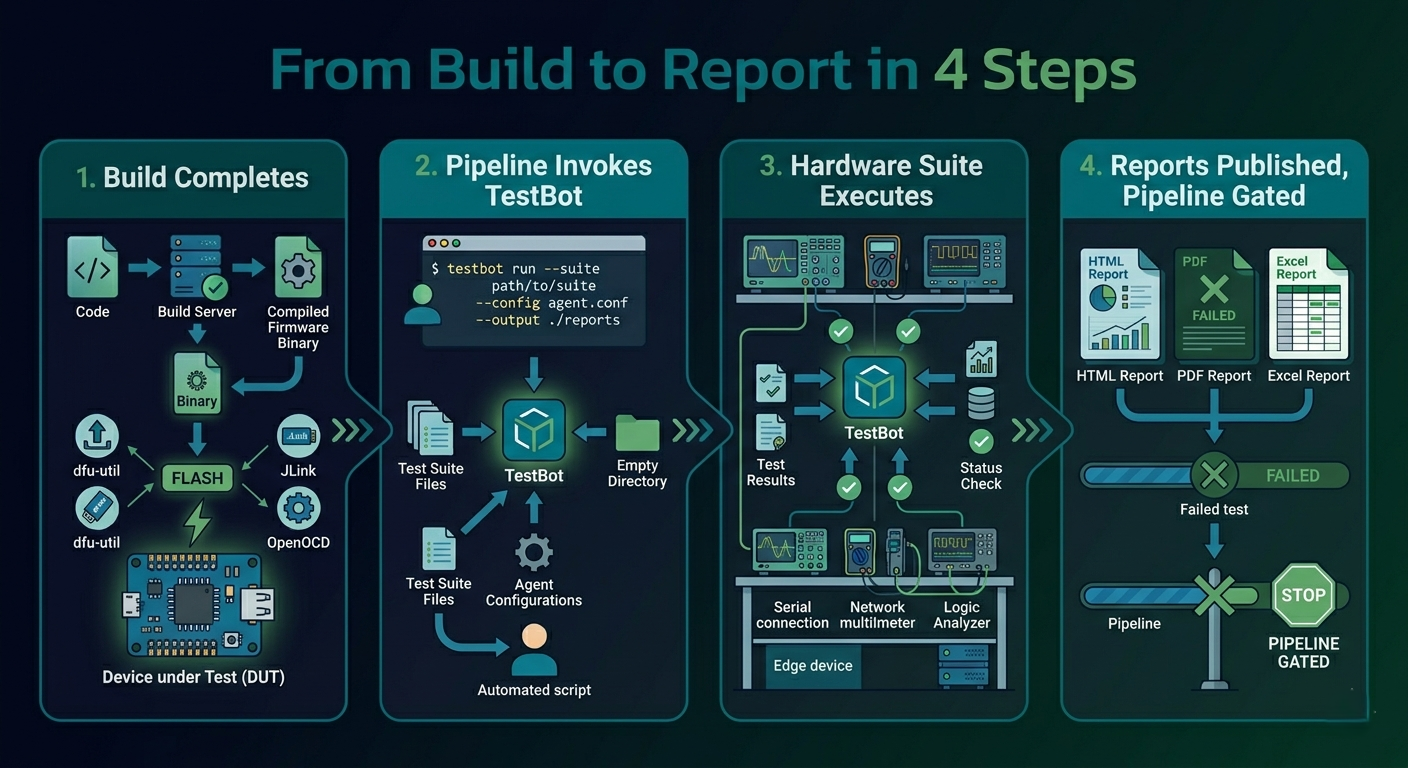
From Build to Report in 4 Steps
Steps
Build Completes Your CI/CD pipeline builds the firmware binary and flashes it to the device under test using your existing flash tool - dfu-util, JLink, OpenOCD, or any vendor tool.
Pipeline Invokes TestBot A single shell command triggers the TestBot command-line runner with the test suite path, agent configuration, and output directory as arguments.
Hardware Suite Executes TestBot initialises all configured agents, runs every test case against real hardware, captures all responses, and evaluates pass/fail criteria.
Reports Published, Pipeline Gated HTML, PDF, and Excel reports are written to the output directory and archived as build artefacts. Non-zero exit code on failure blocks the next pipeline stage automatically.
Works With Every Major CI/CD Platform
Any system that runs shell commands integrates with TestBot - no plugin required.
Jenkins
Add a TestBot shell step to your Jenkinsfile. Use the JUnit XML output for native Jenkins test result visualisation and trend tracking across builds.
GitLab CI
Define a test stage in your .gitlab-ci.yml. TestBot runs on a self-hosted runner connected to your hardware. Artefacts are uploaded automatically and reports appear in the MR pipeline view.
Azure DevOps
Add a TestBot task to your Azure Pipelines YAML. Publish HTML reports as pipeline test attachments and configure pass/fail gating on the test stage.
GitHub Actions
Use a self-hosted runner on the machine connected to your hardware. A simple shell step in your workflow YAML invokes TestBot and uploads the report as a workflow artefact.
Bamboo & TeamCity
Both platforms support arbitrary shell task steps. Configure TestBot as a custom build task, set exit code interpretation for pass/fail, and archive the output directory as build artefacts.
Utility Agent: External Command API
The Utility Agent's External Command API block runs any shell command, script, or executable within a TestBot test sequence - enabling bidirectional CI/CD integration: TestBot can also call back into your pipeline to trigger post-test actions.
Real CI/CD Integration Scenarios
| Scenario | Pipeline Step | Outcome |
|---|---|---|
| Nightly automotive ECU regression | Jenkins Declarative Pipeline - scheduled build, flash + TestBot CAN/UDS suite | 4,000 test cases by morning, HTML report in Jenkins build artefacts, email on failure |
| PR-gated firmware build | GitLab CI - test stage runs on every MR | MR blocked until BLE Central + WiFi suite passes on real hardware |
| OTA update validation | GitHub Actions - triggered on firmware release tag | Webserver agent serves OTA binary, device updates, UDS confirms new version |
| Industrial endurance gate | Azure DevOps - nightly Modbus 24h endurance run | Pipeline fails if any Modbus register deviates; PDF report archived |
| Multi-variant hardware matrix | Jenkins matrix build - 3 hardware revisions in parallel | Same test suite against Rev A/B/C simultaneously, consolidated HTML report |
Frequently Asked Questions - CI/CD Integration

No. TestBot integrates with any CI/CD platform through a shell command. The TestBot command-line runner accepts the test suite path, agent configuration, and output directory as arguments and returns a standard exit code (0 = pass, non-zero = failure). Any pipeline that can execute a shell step - Jenkins, GitLab CI, GitHub Actions, Azure DevOps, Bamboo, TeamCity - works without a dedicated plugin.
RELATED PAGES
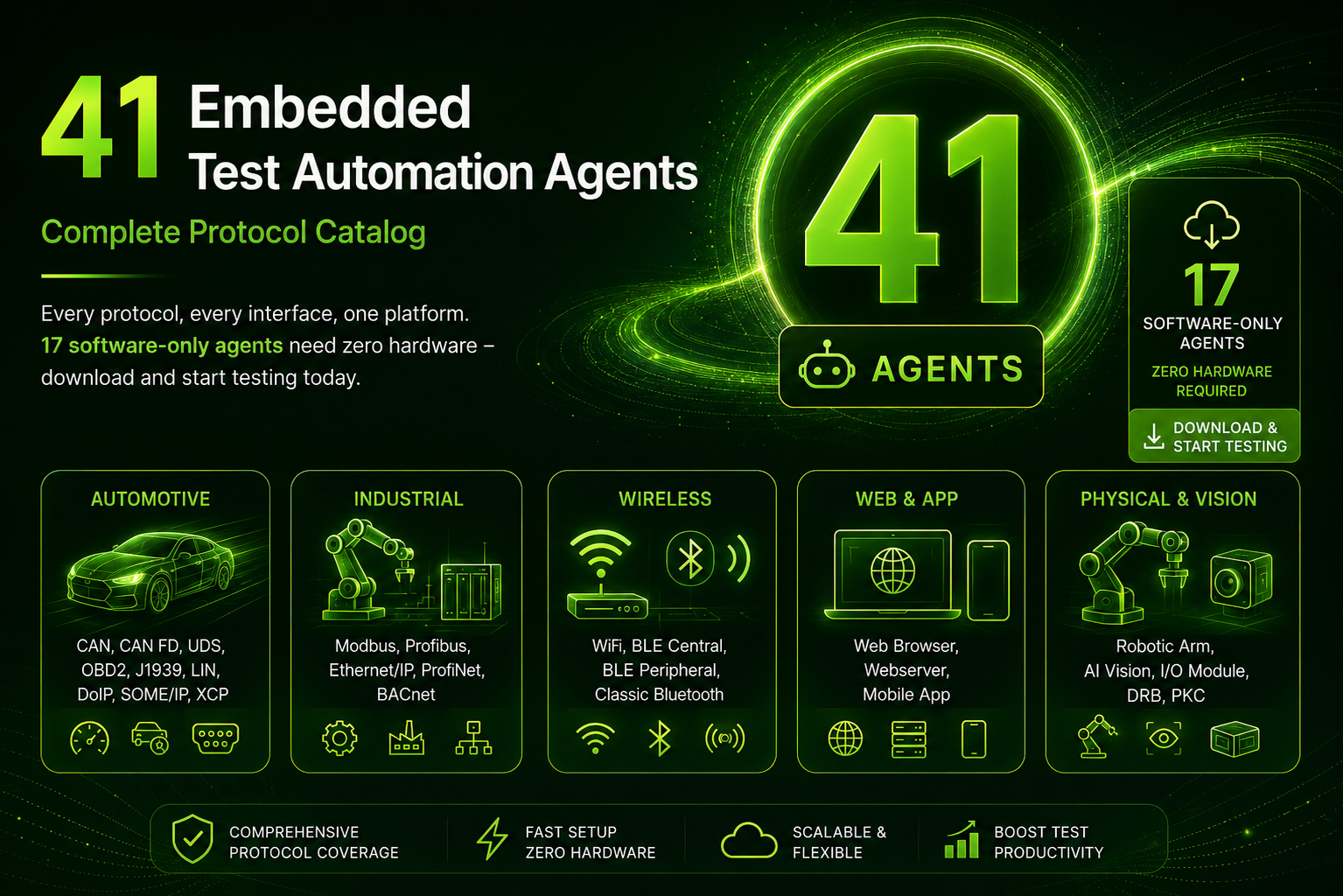
All 41 Agents
The full TestBot agent catalog - every protocol that can be tested in your CI/CD pipeline.

Test Reporting
HTML, PDF, and Excel reports with step-level traceability - what your pipeline publishes as artefacts.
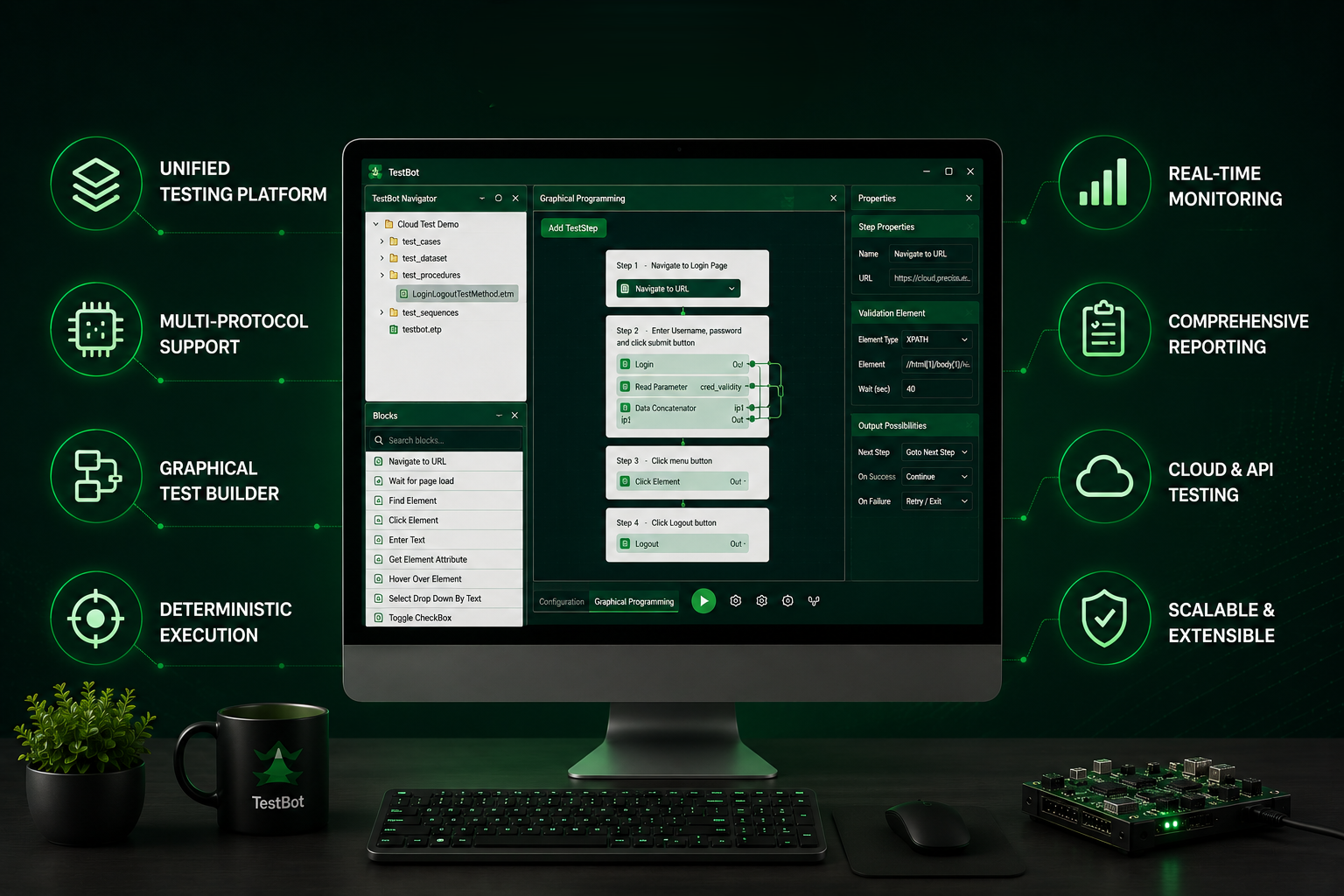
Platform Features
Full TestBot feature set - execution engine, agent architecture, and development modes.
Start Automating Hardware Tests in Your Pipeline
14-day free trial. No credit card required. Software-only agents work on any build agent immediately.