DoIP Testing Without Hardware
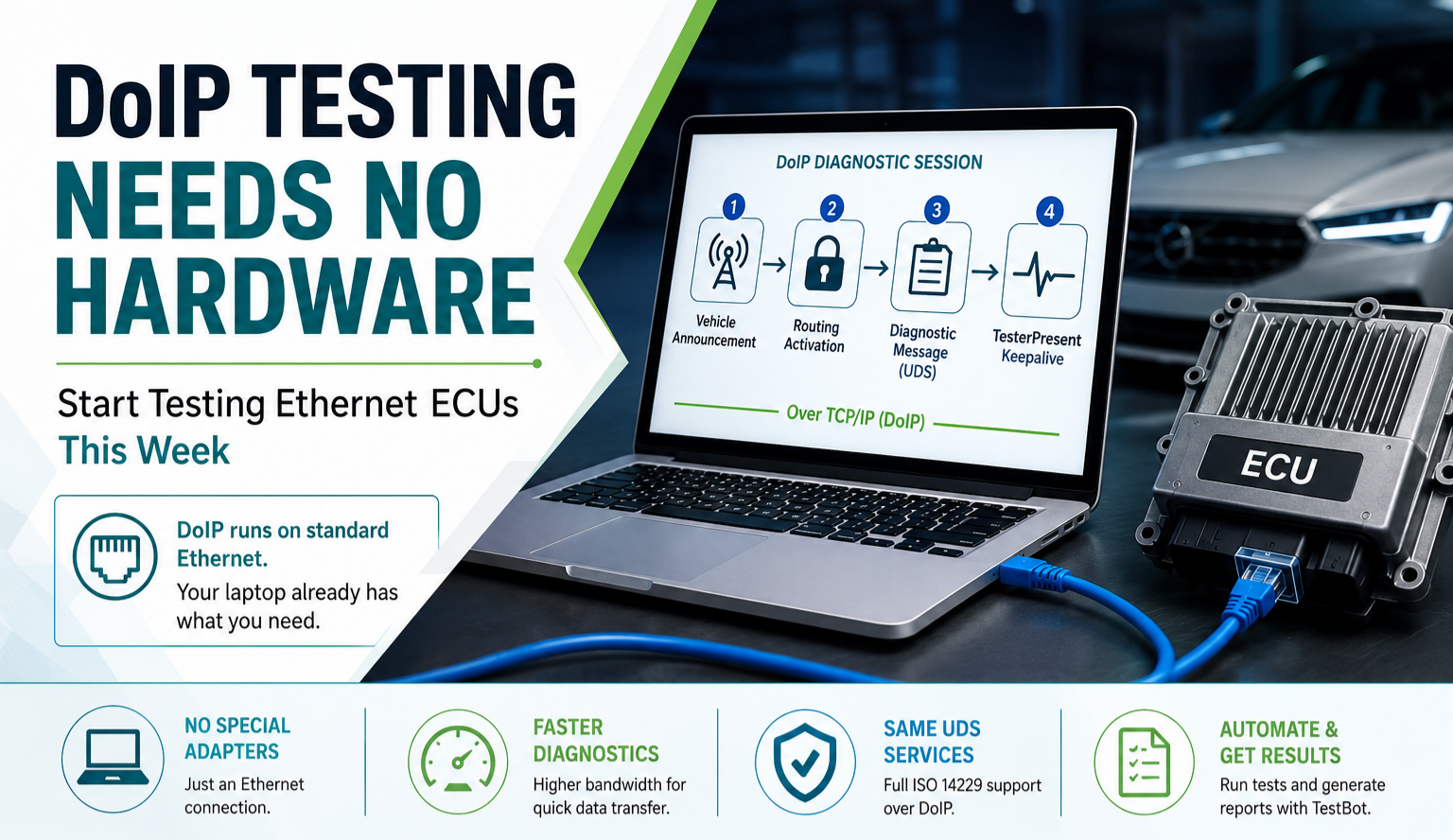
Most embedded test engineers assume that automotive testing means buying hardware. CAN adapter, LIN adapter, PXI chassis - there is always something to order before you can start. This assumption stops teams from evaluating automotive Ethernet protocols for weeks while they wait for procurement.
DoIP breaks that assumption entirely.
What DoIP Is and Why It Matters Now
DoIP - Diagnostics over Internet Protocol (ISO 13400) - is the diagnostic transport that has replaced DoCAN (ISO 15765-2) on Ethernet-connected ECUs. Every EV platform, ADAS domain controller, and central compute unit introduced in the last five years uses DoIP. If you are testing a next-generation ECU, you are testing DoIP.
The reason DoIP needs no hardware is simple: it runs over standard TCP and UDP on Ethernet. The same network interface that connects your laptop to the office WiFi router can send DoIP diagnostic messages to an ECU. There is no USB adapter to buy. No PXI module. No USB-to-automotive-Ethernet bridge. Connect an Ethernet cable from your PC to the ECU and start.
What a DoIP Session Actually Looks Like
A DoIP diagnostic session has four steps:
- Vehicle Announcement - After power-up, the DoIP gateway broadcasts a UDP announcement containing the VIN, EID (Entity Identifier), and GID (Group Identifier). Your tester listens on UDP port 13400 for this packet.
- Routing Activation - Your tester sends a Routing Activation Request over TCP to the gateway's DoIP port (13400). The gateway responds with a Routing Activation Response. This grants diagnostic access to the internal vehicle network.
- Diagnostic Message - You send a UDS ISO 14229 diagnostic request (e.g. 0x22 ReadDataByIdentifier) wrapped in a DoIP Diagnostic Message PDU. The gateway forwards it to the target ECU's logical address and returns the response.
- Connection Management - The connection stays alive via TesterPresent (0x3E) keepalive frames. Timeout values are configurable - typical values are 5s for the DoIP level, 2s for the UDS level.
That is the entire DoIP session. Four steps. No CAN bus involved. No special adapter. Just TCP/IP.
The Three Most Common DoIP Test Failures
Engineers new to DoIP testing run into the same three issues. Knowing them in advance saves hours of debugging:
1. Routing activation rejected with code 0x00 (denial). The most common cause is a wrong source address in the Routing Activation Request. DoIP entities maintain a whitelist of permitted tester addresses. If your tester address does not match the configured whitelist, the gateway denies activation. Fix: check the DoIP entity's configuration for the permitted tester address range.
2. Vehicle Announcement never received. The gateway sends the announcement as a UDP broadcast to 255.255.255.255. If your PC has multiple network interfaces, the OS may route the broadcast differently. Fix: bind the DoIP listener explicitly to the interface connected to the ECU network - not the default route interface.
3. UDS responses arrive but are misrouted. DoIP uses logical addresses to route messages to specific sub-ECUs behind a gateway. If you use the wrong target logical address, the gateway silently discards the diagnostic message or returns a 0x35 DoIP header NACK (incorrect logical address). Fix: verify logical addresses from the vehicle communication matrix or DoIP entity configuration file.
How to Start This Week with TestBot
TestBot's DoIP Client Agent handles all four session steps as configurable test blocks. You provide the gateway IP address and the target ECU's logical address - the rest is handled automatically: vehicle announcement detection, routing activation, UDS transport, and TesterPresent keepalive.
A basic DoIP test sequence in TestBot:
- Add a DoIP Connect block - set the gateway IP, tester address, and target logical address.
- Add a DoIP Routing Activation block - validate the response code is 0x10 (routing successfully activated).
- Add a UDS ReadDataByIdentifier (0x22) block - specify the DID and expected response value.
- Add assertions for response timing - DoIP adds approximately 5–15ms transport overhead vs DoCAN over CAN.
- Run the sequence - the HTML report shows every PDU exchanged, every response time, and pass/fail for each step.
For UDS over DoIP - running the full ISO 14229 session including security access, flash programming, and DTC read - add the UDS over DoIP Client Agent. It handles all 22 UDS services over the DoIP transport automatically.
What DoIP Testing Replaces
Before DoIP, validating ECU diagnostics meant a CAN Adapter, a DoCAN transport configuration, and manual CAN bus setup. The physical layer was the complexity - baud rates, termination, adapter drivers, CAN channel configuration.
DoIP removes all of that. The complexity shifts to the application layer - logical addresses, routing tables, session management - which is where the interesting validation work actually is. The physical layer is just an Ethernet cable.
If you are testing an ECU that supports DoIP and you do not yet have a CAN Adapter, start with DoIP. You are not missing any diagnostic capability - DoIP provides the same UDS services as DoCAN, plus faster transfer rates for flash programming sessions.
The One Thing DoIP Cannot Test
Physical CAN bus behaviour - frame timing, signal encoding, bus load, error states - is not visible over DoIP. If your ECU also communicates over CAN with other nodes, you still need the CAN/CAN FD Agent for that validation. DoIP covers the diagnostic layer. CAN covers the communication layer. In most ECU test suites, both run in the same TestBot sequence.
Read the Full Guide + See the Agent
DoIP Testing Guide - ISO 13400 Automotive Ethernet
The complete DoIP reference: routing activation, vehicle announcement, UDS over DoIP, and all test scenarios - with agent pricing and hardware requirements (spoiler: none).