Web Browser Agent
Purpose
The Web Browser Agent automates web browser interactions to navigate, interact with, and validate web applications during test execution. It enables reliable functional and UI testing by using reusable browser action blocks.
Web Browser Agent Blocks
1. NavigateToURL
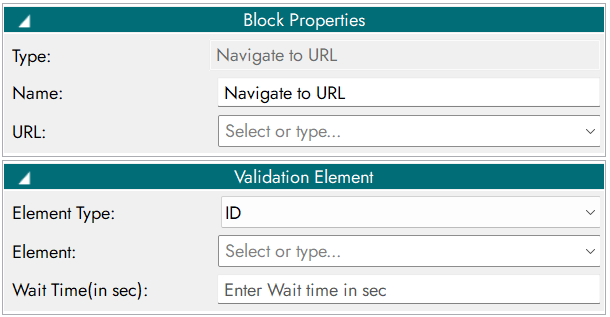
Opens a specified URL and validates the presence and type of an element.

Properties
Inputs
Parameter Name |
Description |
|---|---|
URL |
URL to navigate |
Element |
Element to validate after navigation |
Element Type |
Type of the web element (button, link, textbox, etc.) |
Wait Time |
Maximum wait time (seconds) |
NavigateToURL - input parameter.
Outputs
Output Code |
Description |
|---|---|
0 |
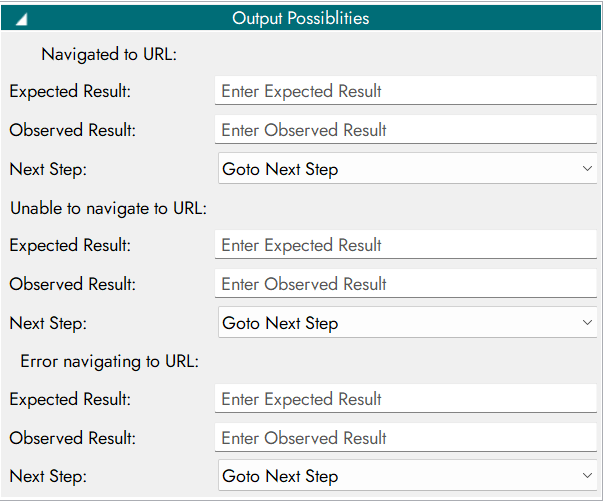
Navigated to URL |
1 |
Unable to navigate to URL |
-1 |
Error navigating to URL |
NavigateToURL - output parameter.
Output Possibilities Configuration
2. Login
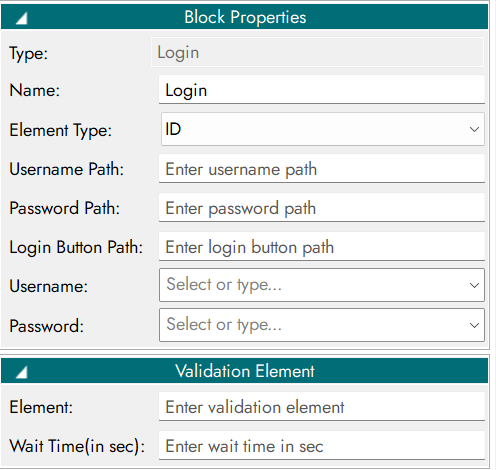
Performs user login by entering username and password.

Properties
Inputs
Parameter Name |
Description |
|---|---|
By |
Locator strategy (XPath, CSS, ID) |
User XPath |
Locator path of username field |
Username |
Username value |
Pass XPath |
Locator path of password field |
Password |
Password value |
Login XPath |
Locator path of login button |
Login - input parameter.
Outputs
Output Code |
Description |
|---|---|
0 |
Logged in |
1 |
Unable to login |
-1 |
Error |
Login - output parameter.
Output Possibilities Configuration

3. Logout
Performs user logout and verifies logout status.

Properties
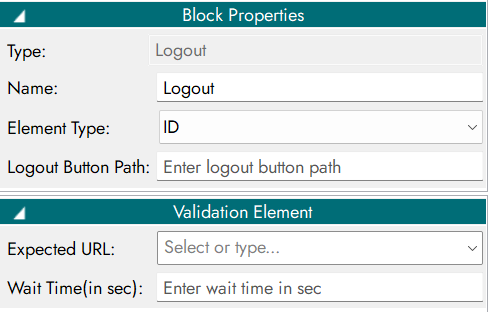
Inputs
Parameter Name |
Description |
|---|---|
By |
Locator strategy |
Path |
Locator path of logout button |
URL |
Redirect URL after logout |
Time |
Timeout (seconds) |
Logout - input parameter.
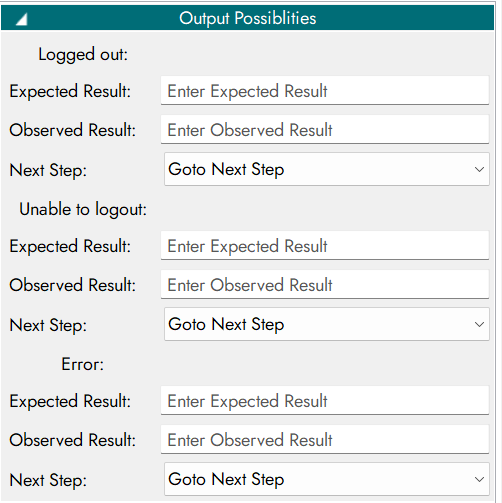
Outputs
Output Code |
Description |
|---|---|
0 |
Logged out |
1 |
Unable to logout |
-1 |
Error |
Logout - output parameter.
Output Possibilities Configuration
4. Input Validator
Validates input values against a regular expression pattern.

Properties

Inputs
Parameter Name |
Description |
|---|---|
By |
Locator strategy |
Element |
Element to validate |
Value |
Value to validate |
Input Validator - input parameter.
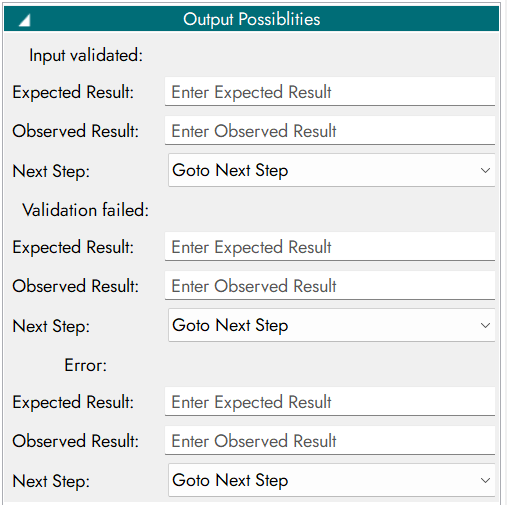
Outputs
Output Code |
Description |
|---|---|
0 |
Input validated |
1 |
Validation failed |
-1 |
Error |
Input Validator - output parameter.
Output Possibilities Configuration
5. Find Element
Locates a web element using a locator strategy.

Properties

Inputs
Parameter Name |
Description |
|---|---|
By |
Locator strategy |
Element |
Element to locate |
Find Element - input parameter.
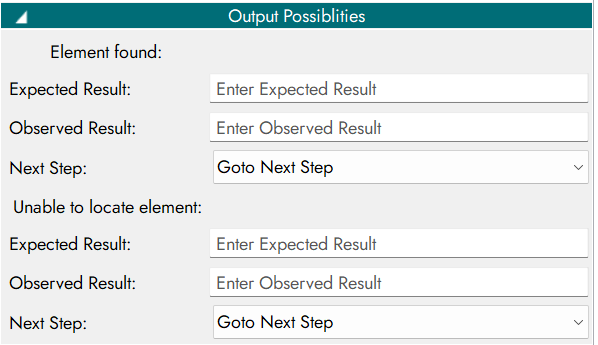
Outputs
Output Code |
Description |
|---|---|
0 |
Element found |
1 |
Unable to locate element |
Find Element - output parameter.
Output Possibilities Configuration
6. Click Element
Locates a web element using a locator strategy.

Properties
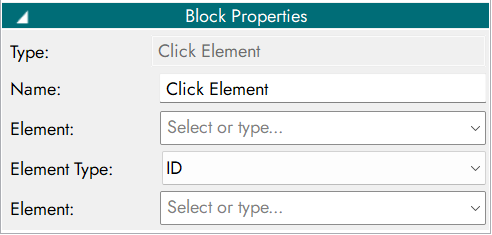
Inputs
Parameter Name |
Description |
|---|---|
By |
Clicked Element |
Element |
|
Click Element - input parameter.
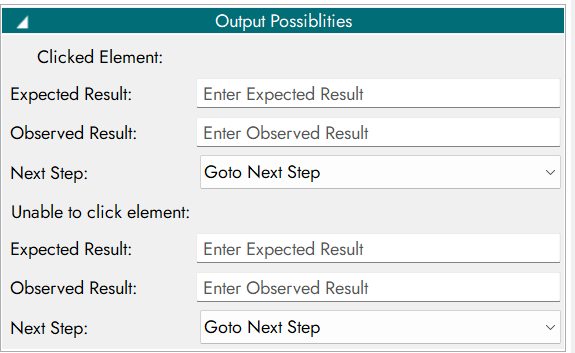
Outputs
Output Code |
Description |
|---|---|
0 |
Click successful |
1 |
Unable to click element |
-1 |
Error |
Click Element - output parameter.
Output Possibilities Configuration
7. Wait for Page Load
Waits until the page is fully loaded or timeout occurs.

Properties
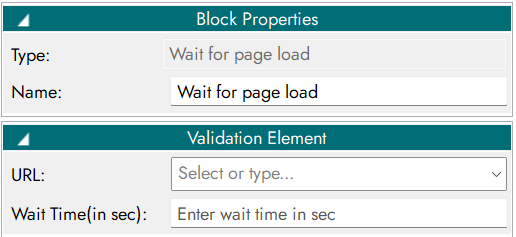
Inputs
Parameter Name |
Description |
|---|---|
URL |
Web page URL |
Timeout |
Maximum wait time (seconds) |
Wait for Page Load - input parameter.
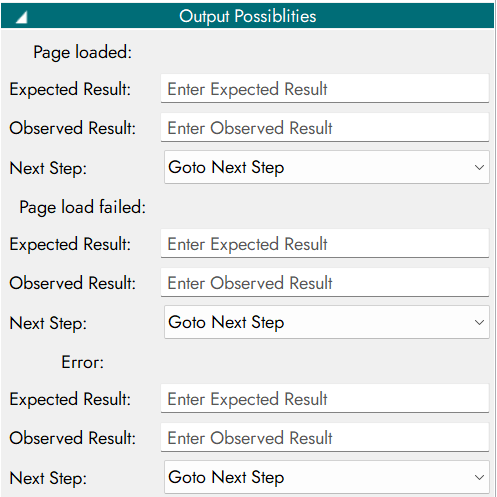
Outputs
Output Code |
Description |
|---|---|
0 |
Page loaded |
1 |
Page load failed |
-1 |
Error |
Wait for Page Load - output parameter.
Output Possibilities Configuration
8. Enter Text
Enters password into a field and validates action.

Properties

Inputs
Parameter Name |
Description |
|---|---|
By |
Locator strategy |
Element |
Password field element |
Text |
Password value |
Enter Text - input parameter.
Outputs
Output Code |
Description |
|---|---|
0 |
Text entered |
1 |
Element Not Found |
-1 |
Invalid Input Text |
Enter Text - output parameter.
Output Possibilities Configuration

9. Get Element Attribute
Retrieves the value of a specified attribute from a web element.

Properties

Inputs
Parameter Name |
Description |
|---|---|
By |
Locator strategy |
Element |
Target element |
Value |
Attribute name (class, id, href, etc.) |
Get Element Attribute - input parameter.
Outputs
Output Code |
Description |
|---|---|
0 |
Attribute retrieved |
1 |
Unable to retrieve attribute |
-1 |
Error |
Get Element Attribute - output parameter.
Output Possibilities Configuration

10. Hover Over Element
Performs mouse hover over a web element.

Properties
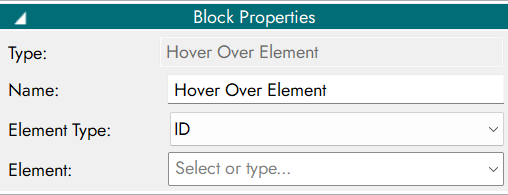
Inputs
Parameter Name |
Description |
|---|---|
By |
Locator strategy |
Element |
Element to hover |
Hover Over Element - input parameter.
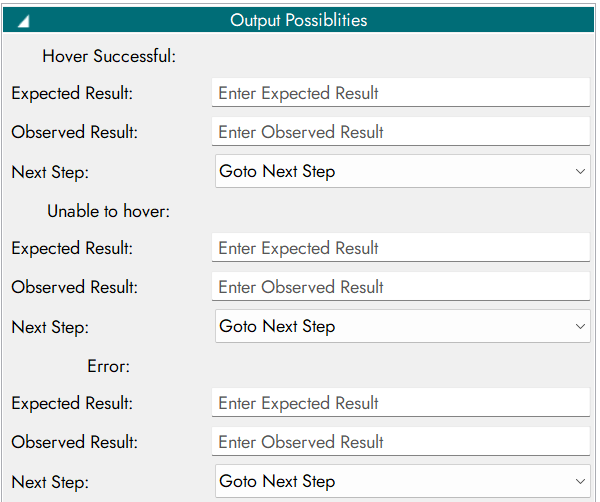
Outputs
Output Code |
Description |
|---|---|
0 |
Hover successful |
1 |
Unable to hover |
-1 |
Error |
Hover Over Element - output parameter.
Output Possibilities Configuration
11. Get Selected Dropdown by Text
Retrieves the selected value from a dropdown.
Properties
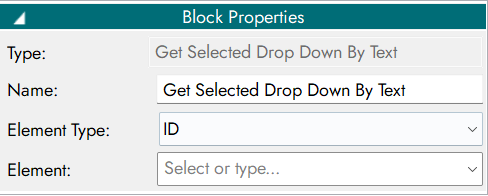
Inputs
Parameter Name |
Description |
|---|---|
By |
Locator strategy |
Element |
Dropdown element |
Get Selected Dropdown by Text - input parameter.
Outputs
Output Code |
Description |
|---|---|
0 |
Selected text retrieved |
1 |
Unable to retrieve selected text |
-1 |
Error |
Get Selected Dropdown by Text - output parameter.
Output Possibilities Configuration

12. Select Dropdown by Text
Selects a dropdown option based on text value.

Properties
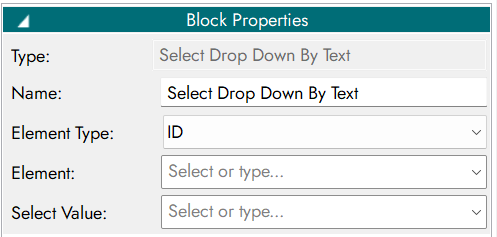
Inputs
Parameter Name |
Description |
|---|---|
By |
Locator strategy |
Element |
Dropdown element |
Value |
Option text to select |
Select Dropdown by Text - input parameter.
Outputs
Output Code |
Description |
|---|---|
0 |
Dropdown selection successful |
1 |
Unable to select option |
-1 |
Error |
Select Dropdown by Text - output parameter.
Output Possibilities Configuration
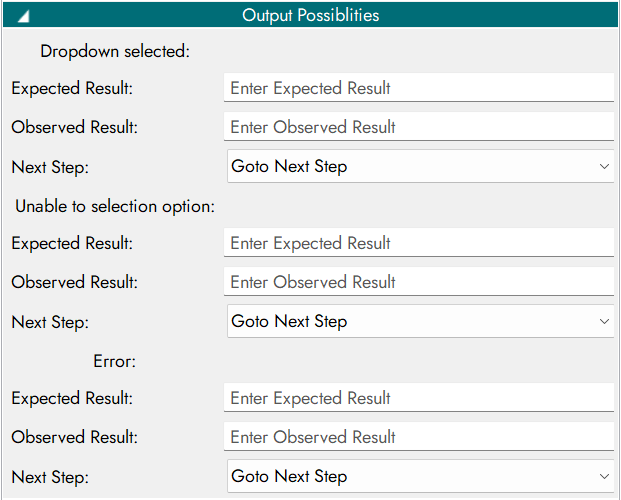
13. Toggle Checkbox
Toggles checkbox state (check/uncheck).

Properties

Inputs
Parameter Name |
Description |
|---|---|
By |
Locator strategy |
Element |
Checkbox element |
Toggle Checkbox - input parameter.
Outputs
Output Code |
Description |
|---|---|
0 |
Checkbox toggled |
1 |
Unable to toggle checkbox |
-1 |
Error |
Toggle Checkbox - output parameter.
Output Possibilities Configuration
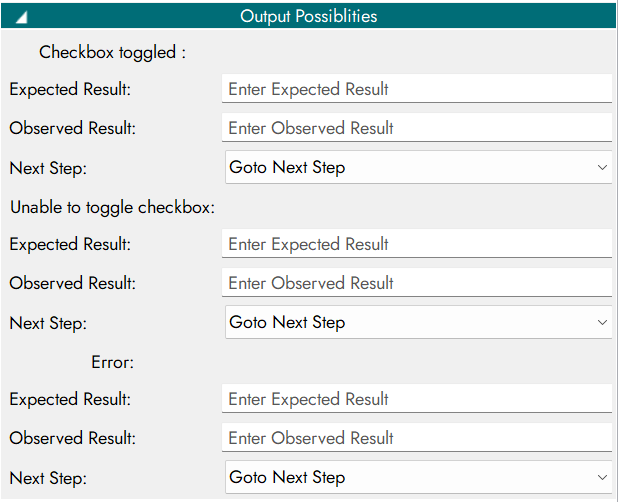
14. Wait for Element
Waits until the element is visible or timeout occurs.

Properties
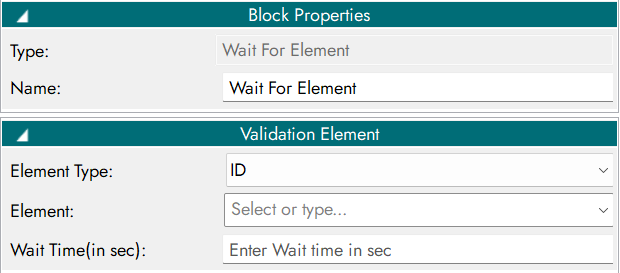
Inputs
Parameter Name |
Description |
|---|---|
By |
Locator strategy |
Element |
Element to wait for |
Wait Time |
Maximum wait time (seconds) |
Wait for Element - input parameter.
Outputs
Output Code |
Description |
|---|---|
0 |
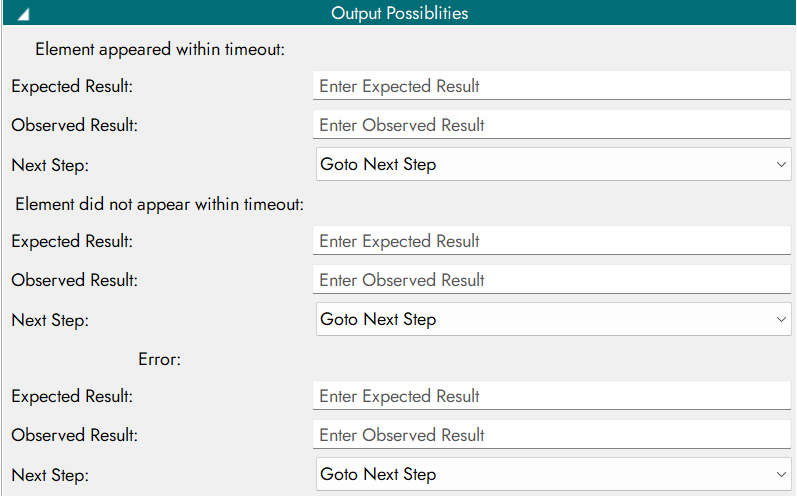
Element appeared within timeout |
1 |
Element did not appear within timeout |
-1 |
Error |
Wait for Element - output parameter.
Output Possibilities Configuration
15. Extract Element Text
Retrieves text content from a web element.

Properties

Inputs
Parameter Name |
Description |
|---|---|
By |
Locator strategy |
Element |
Element to extract text from |
Extract Element Text - input parameter.
Outputs
Output Code |
Description |
|---|---|
0 |
Text extracted |
1 |
Unable to extract text |
-1 |
Error |
Extract Element Text - output parameter.
Output Possibilities Configuration
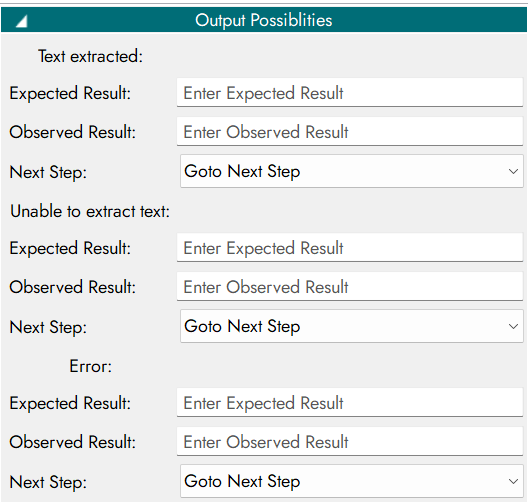
16. Scroll View
Scrolls the page to bring an element into view.

Properties
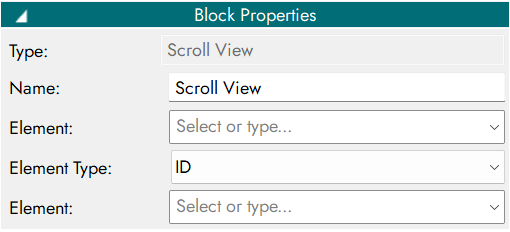
Inputs
Parameter Name |
Description |
|---|---|
By |
Locator strategy |
Element |
Element to scroll into view |
Scroll View - input parameter.
Outputs
Output Code |
Description |
|---|---|
0 |
Scroll successful |
1 |
Unable to scroll |
-1 |
Error |
Scroll View - output parameter.
Output Possibilities Configuration

17. IP Block
Processes and filters IP addresses based on class type.

Properties

Inputs
Parameter Name |
Description |
|---|---|
IP Address |
IP to process |
IP Block - input parameter.
Outputs
Output Code |
Description |
|---|---|
0 |
IP processed |
1 |
Invalid IP |
-1 |
Error |
IP Block - output parameter.
Output Possibilities Configuration
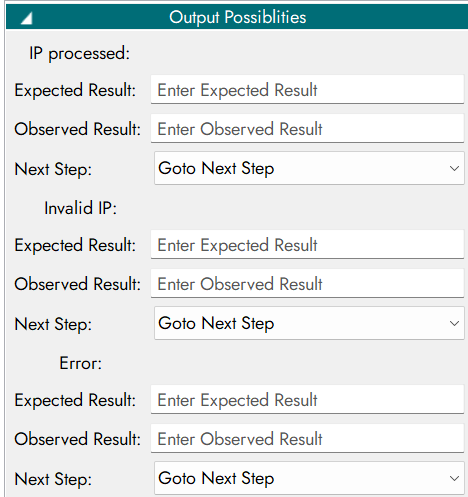
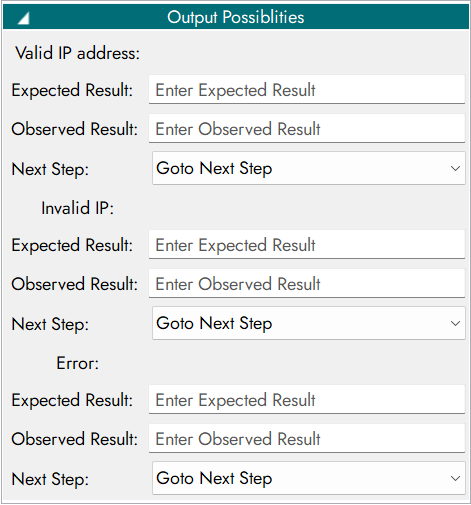
18. IP Block Validator
Validates whether the input is a properly formatted IP address.

Properties
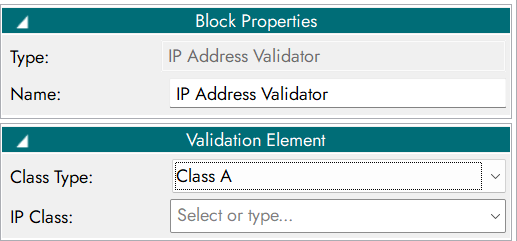
Inputs
Parameter Name |
Description |
|---|---|
IP Address |
IP to process |
Class Type |
IP class (A / B / C) |
IP Block Validator- input parameter.
Outputs
Output Code |
Description |
|---|---|
0 |
Valid IP address |
1 |
Invalid IP |
-1 |
Error |
IP Block Validator- output parameter.
Output Possibilities Configuration
19. Subnet Block
Processes and filters subnet addresses based on class type.

Properties
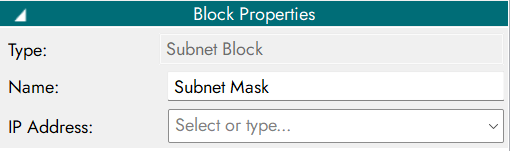
Inputs
Parameter Name |
Description |
|---|---|
IP Address |
IP to process |
Subnet Block - input parameter.
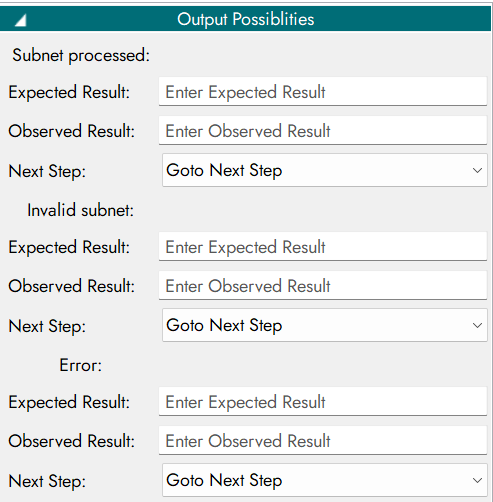
Outputs
Output Code |
Description |
|---|---|
0 |
Subnet processed |
1 |
Invalid subnet |
-1 |
Error |
Subnet Block - output parameter.
Output Possibilities Configuration
20. Subnet Block Validator
Validates whether the input is a correctly formatted subnet mask.

Properties
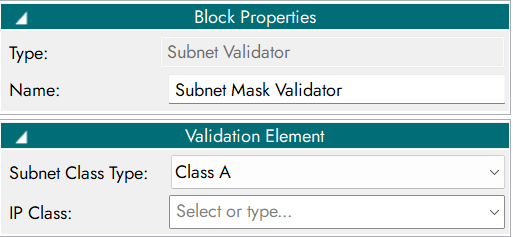
Inputs
Parameter Name |
Description |
|---|---|
IP Address |
Subnet address |
Class Type |
Class type (A / B / C) |
Subnet Validator - input parameter.
Outputs
Output Code |
Description |
|---|---|
0 |
Valid subnet mask |
1 |
Invalid subnet mask format |
-1 |
Error |
Subnet Validator - output parameter.
Output Possibilities Configuration
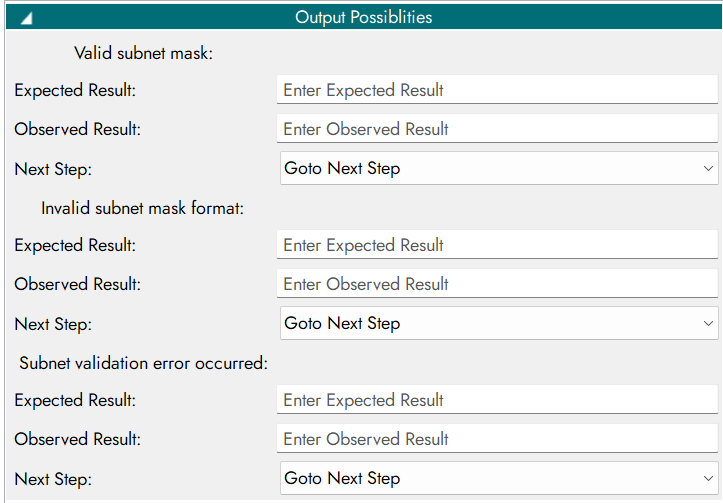
21. Port Block
Processes and filters port addresses.

Properties
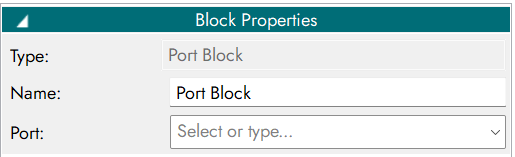
Inputs
Parameter Name |
Description |
|---|---|
Port |
Associated IP |
Port Block - input parameter.
Outputs
Output Code |
Description |
|---|---|
0 |
Port processed |
1 |
Invalid port |
-1 |
Error |
Port Block - output parameter.
Output Possibilities Configuration
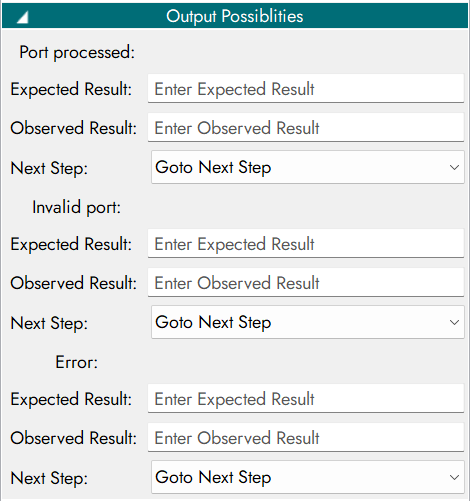
22. Gateway Block
Configures gateway using IP address.

Properties
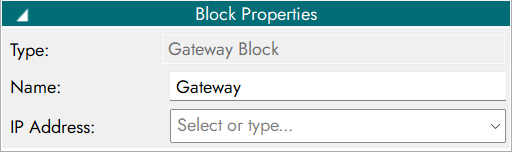
Inputs
Parameter Name |
Description |
|---|---|
IP Address |
Gateway IP |
Gateway Block - input parameter.
Outputs
Output Code |
Description |
|---|---|
0 |
Gateway configured |
1 |
Invalid gateway |
-1 |
Error |
Gateway Block - output parameter.
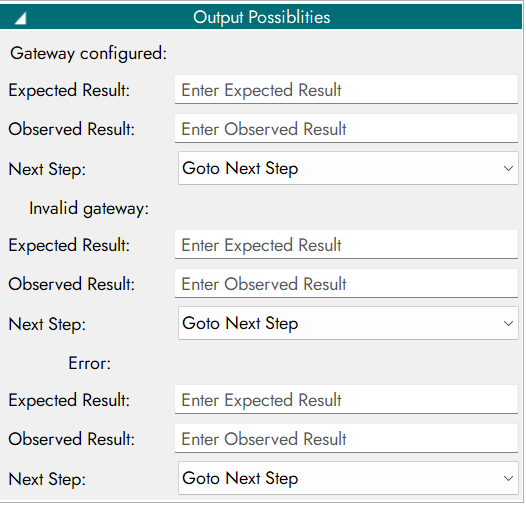
Output Possibilities Configuration
23. Gateway Validator
Validates whether the input is a correctly formatted gateway IP address.

Properties
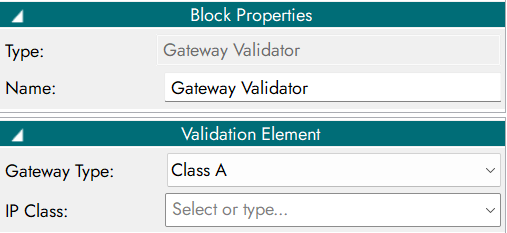
Inputs
Parameter Name |
Description |
|---|---|
IP Address |
Gateway address |
Gateway Type |
Class type (A / B / C) |
Gateway Validator - input parameter.
Outputs
Output Code |
Description |
|---|---|
0 |
Valid gateway address |
1 |
Invalid gateway address format |
-1 |
Error |
Gateway Validator - output parameter.
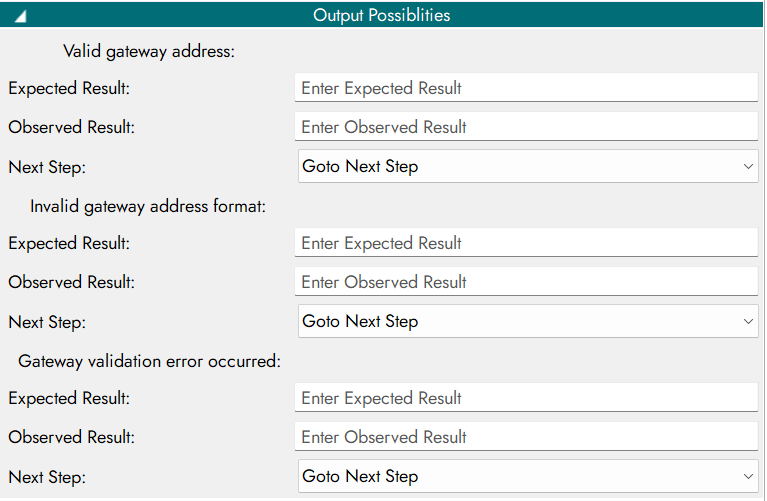
Output Possibilities Configuration
24. Upload File
Uploads a file to a web application.

Properties
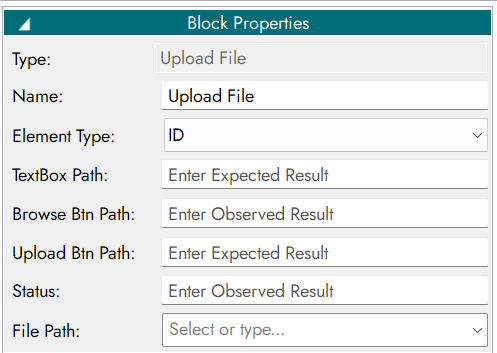
Inputs
Parameter Name |
Description |
|---|---|
By |
Locator strategy |
Element |
File upload element |
Upload File - input parameter.
Outputs
Output Code |
Description |
|---|---|
0 |
File uploaded |
1 |
Unable to upload file |
-1 |
Error |
Upload File - output parameter.
Output Possibilities Configuration

22. Show Popup

Properties
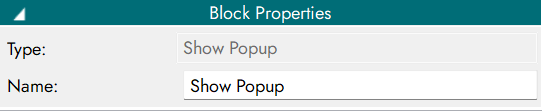
Inputs
Parameter Name |
Description |
|---|---|
By |
Locator strategy |
Element |
Popup element |
Popup XPath |
Popup container path |
Content XPath |
Popup content path |
Close XPath |
Close button path |
Show Popup - input parameter.
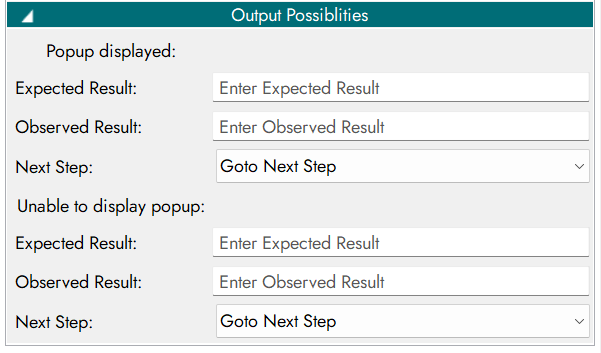
Outputs
Output Code |
Description |
|---|---|
0 |
Popup displayed |
1 |
Unable to display popup |
Show Popup - output parameter.
Output Possibilities Configuration
23. Get Dropdown

Properties
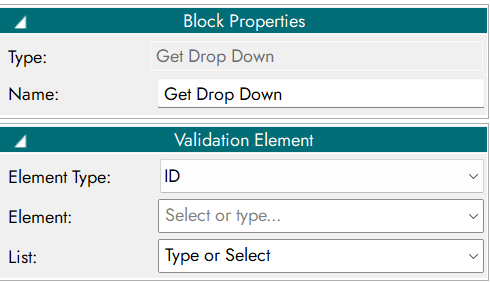
Inputs
Parameter Name |
Description |
|---|---|
By |
Locator strategy |
Element |
Dropdown element |
List |
List of options |
Get Dropdown - input parameter.
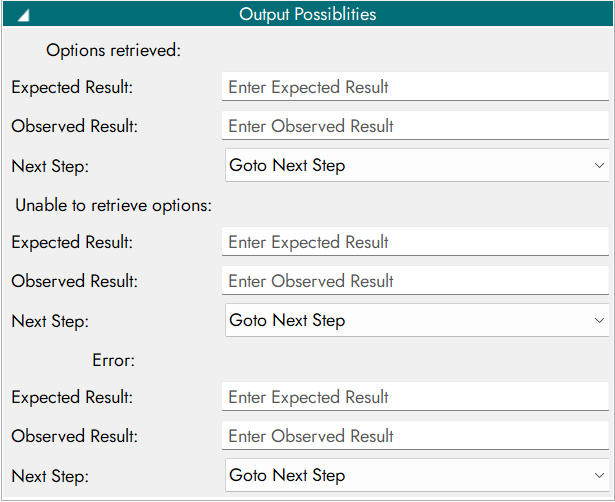
Outputs
Output Code |
Description |
|---|---|
0 |
Options retrieved |
1 |
Unable to retrieve options |
-1 |
Error |
Get Dropdown - output parameter.
Output Possibilities Configuration
24. Textbox Readability Validator
Retrieves options from a dropdown list.
Properties
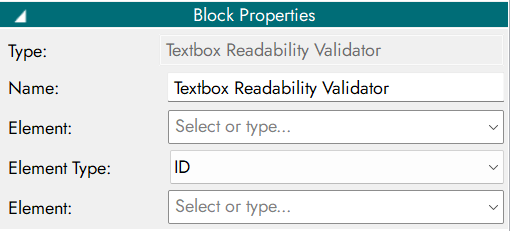
Inputs
Parameter Name |
Description |
|---|---|
By |
Locator strategy |
Element |
Textbox element |
Textbox Readability Validator - input parameter.
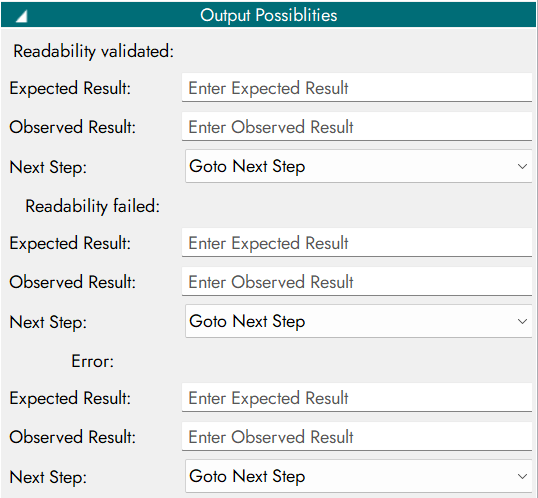
Outputs
Output Code |
Description |
|---|---|
0 |
Readability validated |
1 |
Readability failed |
-1 |
Error |
Textbox Readability Validator - output parameter.
Output Possibilities Configuration
25. Add Table Row
Adds a new row to a table.

Properties
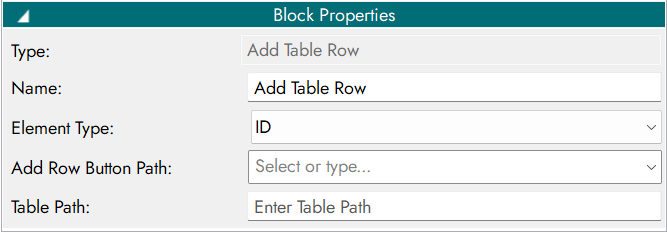
Inputs
Parameter Name |
Description |
|---|---|
By |
Locator strategy |
Add Btn Path |
Add row button path |
Table Path |
Table locator path |
Add Table Row - input parameter.
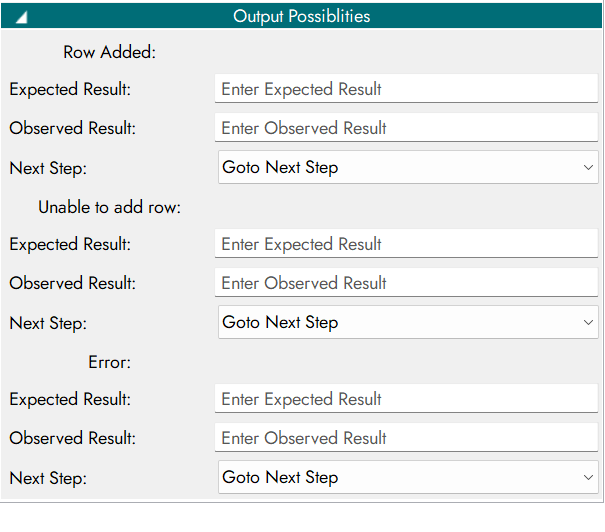
Outputs
Output Code |
Description |
|---|---|
0 |
Row added |
1 |
Unable to add row |
-1 |
Error |
Add Table Row - output parameter.
Output Possibilities Configuration
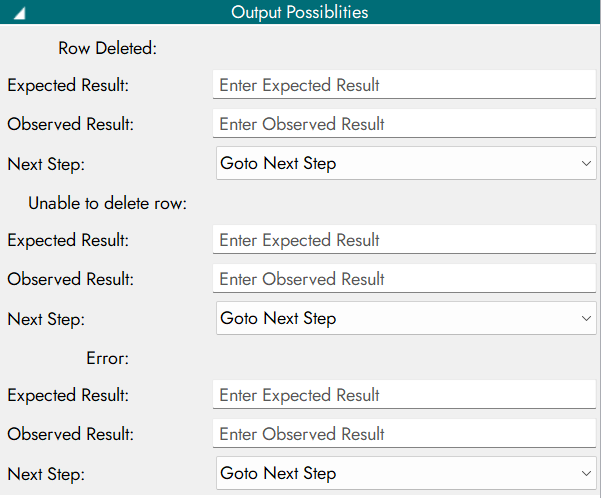
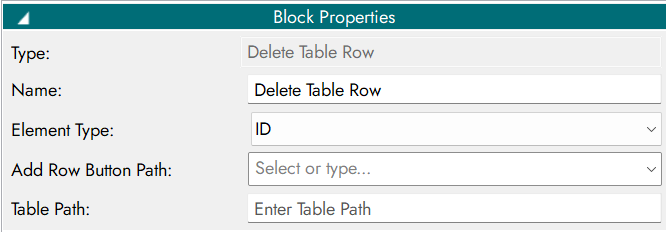
26. Delete Table Row
Deletes a row from a table.

Properties
Inputs
Parameter Name |
Description |
|---|---|
By |
Locator strategy |
Delete Btn Path |
Delete row button path |
Table Path |
Table locator path |
Delete Table Row - input parameter.
Outputs
Output Code |
Description |
|---|---|
0 |
Row deleted |
1 |
Unable to delete row |
-1 |
Error |
Delete Table Row - output parameter.